
Secure Every Identity with Microsoft Entra ID
Empower your organization with comprehensive identity and access management solutions designed for a secure digital ecosystem.

Integrated Identity and Network Access Solutions
Safeguard your organization with a cloud identity and access management solution that connects employees, customers, and partners to their apps, devices, and data.
Access Any App or Resource Securely
Take advantage of adaptive identity and network access controls to secure access to any app or resource for every user or digital workload across your entire environment.
Simplify the user experience
Reduce IT friction and improve the hybrid workforce experience with seamless access to any resource, single sign-on, user self-service management, and automated lifecycle .
Protect and verify every identity
Implement consistent security policies for every user—employees, frontline workers, customers, partners—as well as apps, devices, and workloads across multicloud and hybrid.
Centralized Identity Oversighty
Administer all user identities and their access permissions from a single centralized location, whether on cloud or on-premises, to enhance oversight and improve control.
Provide only the access necessary
Discover and right-size permissions, manage access lifecycles, and ensure least privilege access for any identity to enhance security, reduce risk, and streamline compliance.
Streamlined Sign-In Process
Enable quick and effortless sign-in processes across your multicloud setup, boosting user productivity, minimizing password management time, and enhancing efficiency.
Thorough Capabilities
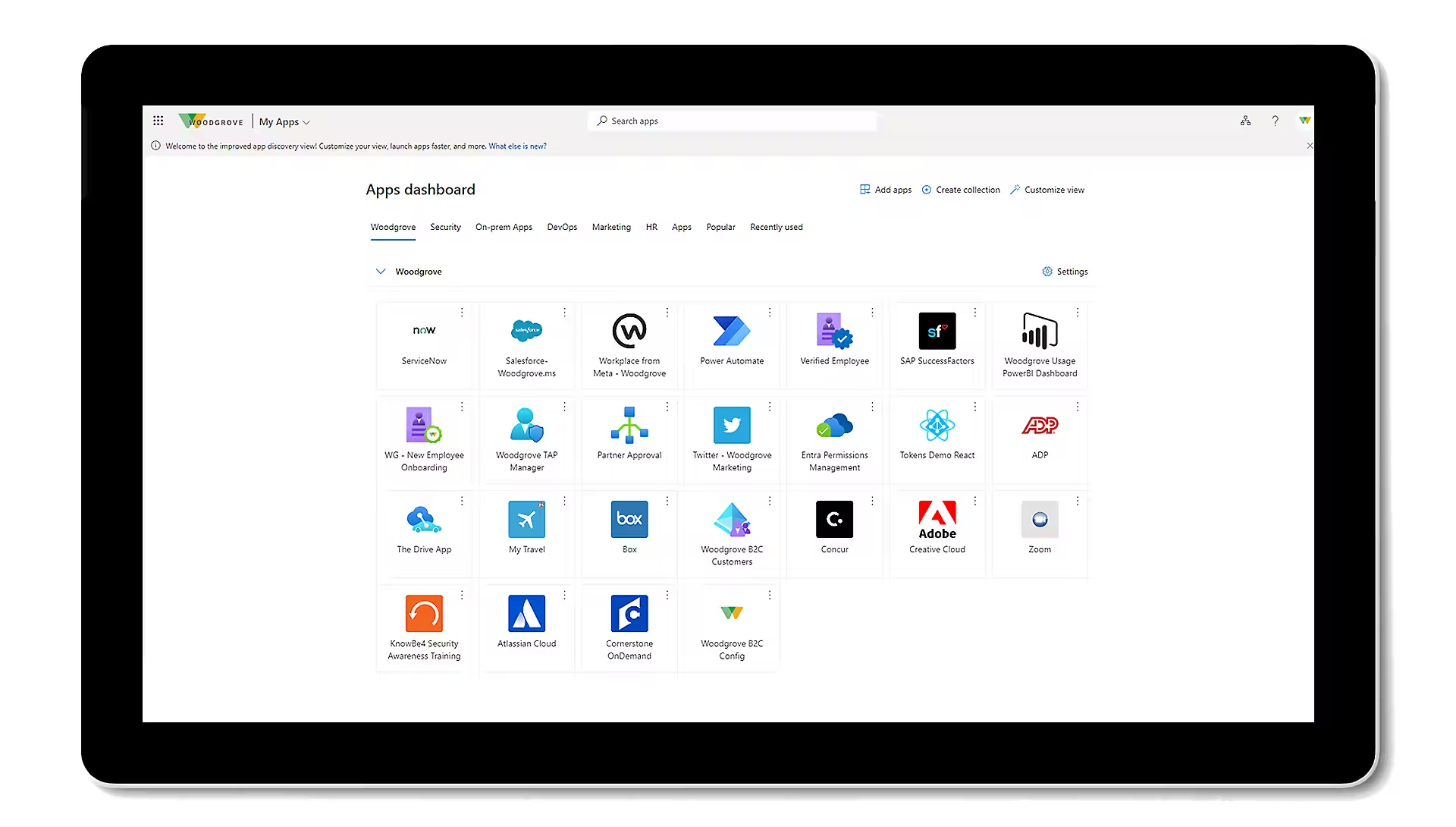
Application Connectivity and Unified Login
Enable your workforce to access all applications from any location and device. Streamline access with universal single sign-on for seamless productivity across diverse environments. Enhance user convenience while maintaining robust security measures to protect sensitive data and mitigate risks associated with remote access.
Passwordless and Multifactor Authentication (MFA)
Protect access to data and applications while maintaining simplicity for users. Offer user-friendly access without the security risks associated with passwords. Implement passwordless authentication methods, such as biometrics or single sign-on, to enhance security and improve user experience. Ensure secure, seamless access to critical resources while reducing the risk of unauthorized access.
Access Based on Conditions
Implement robust access controls to strengthen your organization's security. Ensure appropriate permissions to minimize risk and maintain compliance. Regularly update access policies and conduct thorough audits to detect and rectify any discrepancies. Foster a culture of security awareness to support these measures and safeguard sensitive information.
Safeguarding Personal Identification
Automate the identification and resolution of identity-related risks. Enhance security by proactively addressing potential vulnerabilities. Implement continuous monitoring to detect anomalies and use advanced analytics to predict and mitigate threats before they can impact your organization.
Management of Sensitive User Accounts
Enhance the security measures for your privileged accounts. Protect critical assets by implementing stringent access controls and monitoring. Regularly review and audit privileged access, enforce multi-factor authentication, and apply the principle of least privilege to reduce potential risks. Ensure continuous monitoring and timely responses to any suspicious activities.
Self-Managed Services for Users
Enable your employees to securely manage their identities through self-service portals such as My Apps, My Access, My Account, and My Groups. These user-friendly portals empower employees to handle password resets, update personal information, request access to resources, and manage group memberships without IT intervention. By providing these tools, you can enhance user satisfaction, improve efficiency, and reduce the administrative burden on your IT team.
Centralized Administrative Dashboard
Enhance the security measures for your privileged accounts. Protect critical assets by implementing stringent access controls and monitoring. Regularly audit and review privileged access to ensure compliance and quickly detect any unauthorized activities. Use multi-factor authentication and enforce the principle of least privilege to minimize security risks.
Multicloud Identity and Access Security Solutions
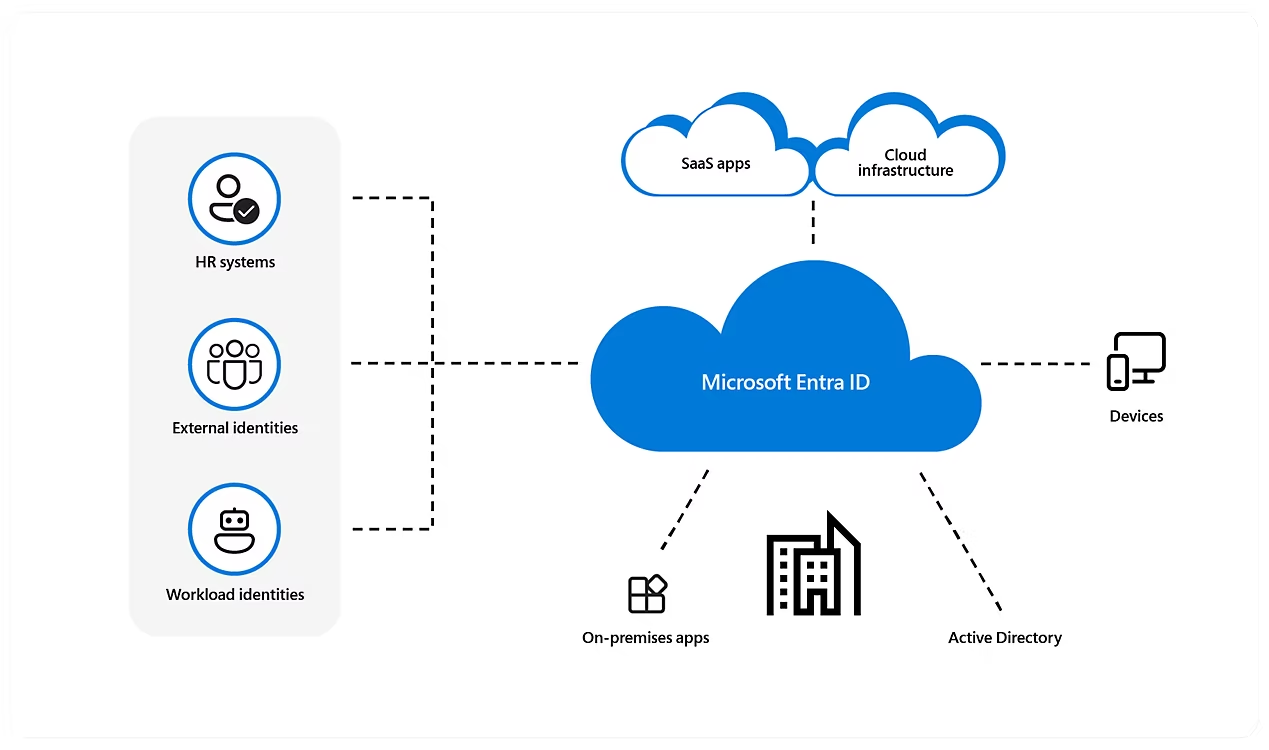
Microsoft Entra ID is an integrated cloud identity and access solution, and a leader in the market for managing directories, enabling access to applications, and protecting identities.
Explore the Microsoft Entra product family
Safeguard connections between people, apps, resources, and devices with multicloud identity and network access products.
Identity and access management
Microsoft Entra ID (formerly Azure Active Directory)
Manage and protect users, apps, workloads, and devices
Microsoft Entra ID (formerly Azure Active Directory)
Protect, monitor, and audit access to critical assets.
Microsoft Entra External ID
Provide your customers and partners with secure access to any app.
New identity categories
Microsoft Entra Verified ID
Issue and verify identity credentials based on open standards.
Microsoft Entra Permissions Management
Manage identity permissions across your multicloud infrastructure.
Network access
Microsoft Entra Internet Access
Secure access to internet, software as a service, and Microsoft 365 apps.
Microsoft Entra Private Access .
Help users to securely connect to private apps from anywhere
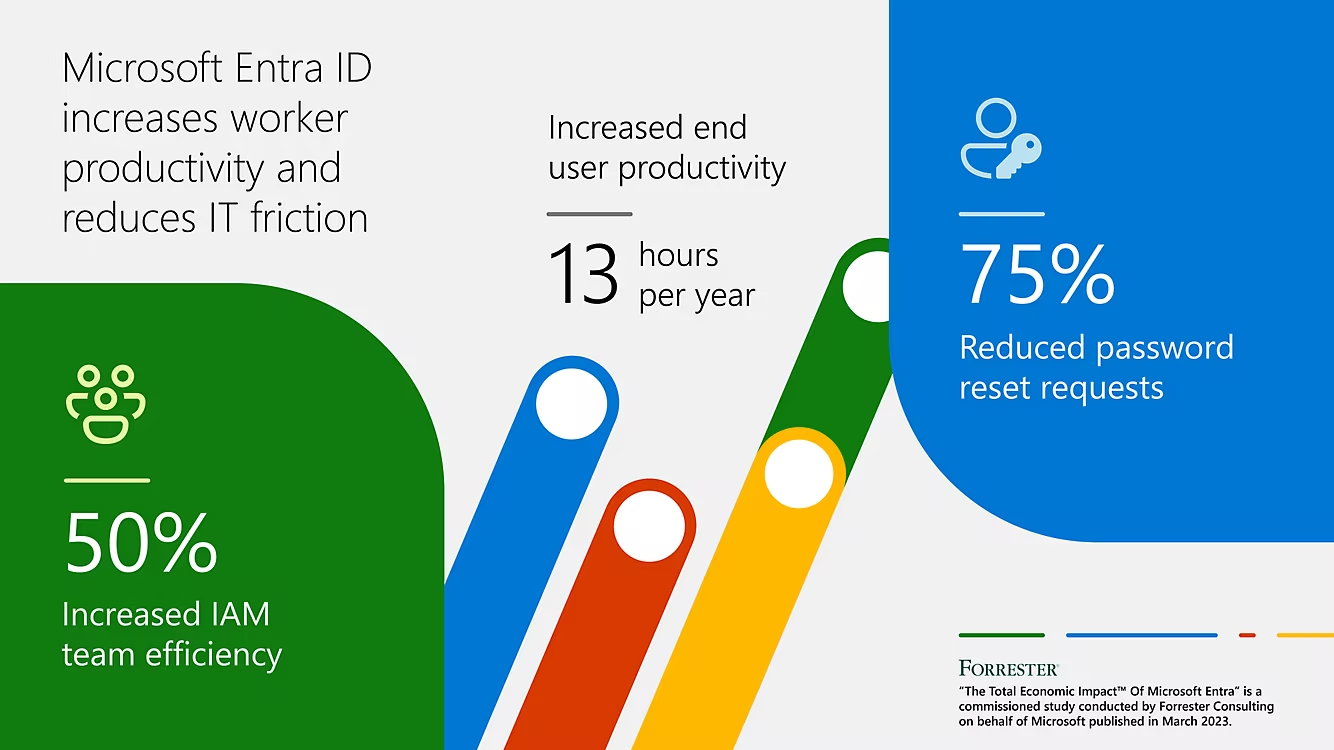
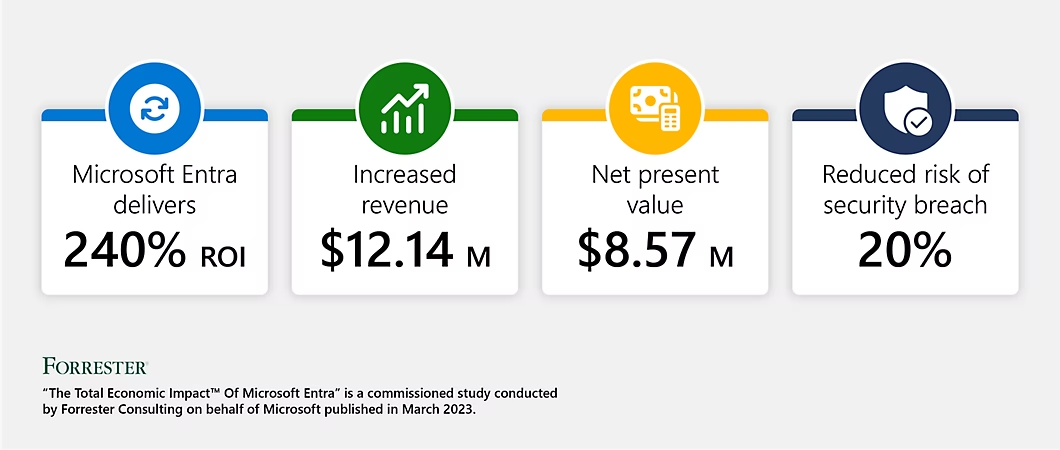
Discover the Total Economic Impact of Microsoft Entra
Microsoft Azure Logic Apps specialty
Leverage write-once, run anywhere ability
Leverage write-once, run anywhere ability
Integrate with SaaS and enterprise applications
Integrate with SaaS and enterprise applications
Unlock value from on-premises and cloud computing applications
Automate EAI, B2B/EDI, and business processes
The power of Microsoft Cloud Computing enhances your integration solutions
Discover the Total Economic Impact™ of Microsoft Entra
 English
 Arabic
 Chinese (Simplified)
 Czech
Czech Dutch
Dutch French
 German
 Italian
 Portuguese
 Russian
 Serbian
 Spanish
 Tajik
Tajik Ukrainian
 Uzbek
Uzbek Vietnamese